Your ERP, CRM, and custom applications already contain years of business knowledge. EnterGenni turns their existing data model into an AI layer you can deploy in a few clicks — without replacing the systems that already run your business.
New: ask your enterprise in plain English, from a ready-made question library, or by drag and drop →
// FK → relationship intelligence Employee ──REPORTS_TO──▶ Employee Employee ──HOLDS_ROLE──▶ Designation Department ──BELONGS_TO──▶ Company // + constraints, indexes, schema-diff CREATE CONSTRAINT employee_sqlid …
// Traversal library (generated) // Impact · shortest path · hierarchy MATCH p = shortestPath((a)-[*..15]-(b)) // Named intents when semantic layer on // employee_full_profile · org_chart_full
// Relational → graph mirror MERGE (n:Employee { SqlId: $id }) SET n.Name = $name … // Call after ORM SaveChanges // MERGE pipelines · SqlId sync key
// "Which customers placed the most orders?" MATCH (o:Order)-[:PLACED_BY]->(c:Customer) RETURN c.Name AS customer, count(o) AS orders ORDER BY orders DESC LIMIT 25 // ✓ read-only · checked · export to Excel
// One ZIP · every layer aligned
Ontology/ JSON + OWL/Turtle
GraphDB/ schema · APIs · sync
Queries/ Cypher + repository
Neo4jNative/ Docker import bundle
Ask/ questions · console
Deploy/ Aura · Cloud Run · Azure
RUN-REPORT deployment guideEvery enterprise already has the knowledge: customers, orders, products, employees, suppliers, contracts, transactions. It's just distributed across systems that were never asked to talk to each other.
AI can read the records in each one. It struggles with how they connect across systems — and that's where most enterprise AI initiatives stall.
EnterGenni gives you an AI layer that sits alongside your existing systems — explicit relationships, shared context, and live sync — so AI can reason across your enterprise instead of guessing between fragments.
| Traditional enterprise modernization | EnterGenni |
|---|---|
| Replace or rebuild systems | ✓ Keep existing systems |
| Manually model relationships | ✓ Derive from foreign keys |
| Hand-build integrations and AI plumbing | ✓ Make the enterprise AI-ready in a few clicks |
| Build APIs separately | ✓ Generate APIs |
| Build sync separately | ✓ Generate sync services |
| Hand-maintain traversal queries | ✓ Generate the traversal library |
| Manually repair after schema changes | ✓ Regenerate from the updated model |
| AI becomes another isolated project | ✓ AI readiness becomes an enterprise capability |
It's not an ERP or CRM replacement, not a data warehouse, not a generic ETL tool, and not a chatbot or an LLM. It does not infer business logic beyond your schema and curated rule packs, and does not guess at flows a column name doesn't support.
It is the knowledge infrastructure layer that turns your existing relational systems into something AI can reason over.
EnterGenni reads your existing schema or validated model — SQL DDL (Postgres, MySQL, SQL Server, Oracle, Supabase, Microsoft Fabric), Excel, JSON, CSV, OpenAPI, OData $metadata (Dynamics 365, SAP Gateway), Dataverse entity definitions, SAP dictionary tables and BAPI structures, SAP IDoc definitions or a Salesforce describe export. Several systems at once if you have them.
It identifies entities, relationships, constraints, and structural dependencies from your foreign keys and collections.
It builds a connected knowledge representation of your enterprise — the same domain you already run, made explicit and queryable.
Graph schema, APIs, repositories, sync services, traversals, ontology, and deployment artifacts — all from that one model. Under the hood: EnterGenni's Knowledge Graph Compiler, 17 coordinated generation passes, under 3 seconds for most models.
Run the AI layer alongside your existing systems. Your source database stays read-only throughout.
Give GraphRAG, agents, search, and analytics a connected representation of your enterprise to reason over. Regenerate when the domain changes.
Before anything is generated you can review the names, line up several systems into one picture, and settle types and lengths once. Every change is logged with where it came from and where it went, so you can audit it or take it back.
Every entity, field and relationship gets suggested names. Accept one with a click or type your own. TBL_CSTMR_MST becomes CustomerMaster, CSTMR_NM becomes CustomerName. AI suggestions (Pro, Enterprise and the trial) see names and types only, never your data. In a hurry? Switch on auto-apply for a project: confident AI names are applied for you, marked in the log, and one click reverts them.
Upload metadata from Fabric, Dynamics 365 and Dataverse, SAP (dictionary tables, BAPI structures, IDocs), Salesforce, a custom app, or any mix. EnterGenni proposes which entities mean the same thing, shows the evidence, and builds two pictures: AS-IS (every system side by side) and Refined (merged along the links you accept). Nothing merges until a person says so.
Global rules turn varchar(8000) or money into the type and length your target needs, with a live preview of what would change. Or edit a single field. Generated code carries the lengths and guards values that do not fit.
Every model comes with a library of ready-made questions, a drag-and-drop query designer, and plain-English drafting. Each question becomes a read-only query you can see before it runs, and the answer exports to Excel, CSV or JSON.
Hundreds of ready-made questions, grouped by what you want to know: overview, look-ups, connections, hierarchies, data quality, impact, figures and the business intents of your domain. Pick one and run it.
Type "Which customers ordered most last quarter?" and get a query drafted from your schema, never your data. You see it, adjust it, then run it. On Pro, and with your own AI key in your generated application.
Drop labels, relationships, properties and aggregators such as count, sum and average onto the canvas. The query writes itself as you build, with filters passed safely as parameters.
Download results as CSV, TSV, Excel, JSON or Markdown, or save the query as a Cypher file for your team, your notebook or your BI tool.
Three barriers stand before your data: a check that allows only reading queries over your own schema, a plan check, and a read-only transaction with a time limit. Credentials and results are never stored.
The same question library, designer and exports ship inside your generated code as a console page, behind your own sign-in, so teams can ask questions of production data where it lives.
EnterGenni produces the graph model, APIs, sync services, traversal layer, deployment artifacts, and documentation from the same enterprise model — validated and packaged together, verified on our sample ERP model in the sandbox.
Full pipeline walkthrough → How it works
Provision a Neo4j Aura database in your own Aura account straight from EnterGenni, apply your schema, and deploy the generated API with ready-made scripts. You own and pay for everything, and EnterGenni keeps no keys, passwords or data.
Paste an Aura API key, choose a size and region, and the instance is created in your account with your model's constraints and indexes applied. The password is shown once, to you. On Pro.
A Dockerfile and scripts for Google Cloud Run, Azure Container Apps and Docker Compose, with the database password kept in your cloud's secret store. Provisioning scripts for Bash and PowerShell too.
Pro exports the model as ontology.json and as an OWL 2 ontology in Turtle: labels as classes, properties with their types, relationships with their inverses, ready for Protégé, a triple store or a data catalogue.
A graph migration isn't hard on day one. The hard question is what happens six months later, when a table, a field, or a relationship changes. Every graph consultancy hits this wall — EnterGenni is built for what comes after launch day.
Generated from your foreign keys and collection relationships — not inferred business semantics. This is the connected representation GraphRAG, agents, search, and analytics tools consume — the query patterns graph projects spend weeks writing by hand.
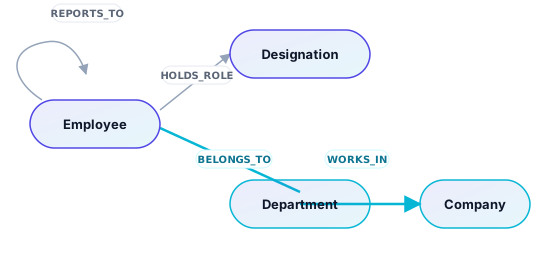
Highlighted in cyan: a shortest-path traversal, Employee → Department → Company (2 hops) — one of the query patterns below, generated automatically.
Starter+ applies domain rule packs (HR, finance, retail, CRM, and 7 more) to emit typed relationships like REPORTS_TO and named intents like employee_full_profile. This is curated pattern matching on your schema — deterministic, reviewable, toggleable.
We still do not infer arbitrary business flows from column names alone, and a question in plain English becomes a read-only query you can see before anything runs. Pro adds ontology.json and an OWL/Turtle export for GraphRAG and governance tooling. EnterGenni gives AI a connected representation of your enterprise to reason over — it doesn't claim to understand your business automatically.
“We didn't need another import tool — we needed the whole relationship layer. EnterGenni gave us APIs, sync, and traversals from our ERP schema in one afternoon.”
“Our AI initiative was blocked on graph infrastructure. EnterGenni compiled the full platform from our ERP schema — repositories, APIs, SDK, sync, and traversals — in one afternoon.”
“Schema evolution sold it. When product adds modules, we regenerate — we don't rebuild the graph program from scratch.”
Illustrative quotes representing typical buyer outcomes.
Every plan ships a deployable platform ZIP. Upgrade for traversals, semantic layer, seed data, and live deploy.
No. You upload a schema export or metadata file. The AI layer deploys separately and sync services are code you control. If you choose to run questions on a database from the Ask page, they run read-only and nothing is stored.
Yes. Every model comes with a library of ready-made questions grouped by intent, a drag-and-drop query designer, and plain-English drafting on Pro. Each question becomes a read-only query you can see before it runs, and results export to Excel, CSV, JSON, Markdown or Cypher. See the sample questions.
No. Provision on Aura creates the database in your own Neo4j Aura account, and the generated deploy scripts run the API in your own cloud. EnterGenni keeps no keys, passwords or data. See how deployment works.
Yes. Upload two to eight metadata files, including SQL, OData, Dataverse, SAP dictionary and IDoc definitions, Salesforce, OpenAPI, Excel, JSON or CSV, and review the proposed links between systems. You get an AS-IS picture and a Refined one, with a log of every decision. The enterprise sandbox shows four systems become one, no signup.
Only names, types and lengths of entities, fields and relationships, and your question when you ask in plain English. Never row data. AI suggestions are applied only on your click, unless you switch on auto-apply for a project; then each AI-applied name is marked and can be reverted. See the FAQ and privacy policy.
A few clicks turn your existing schema into an AI layer for your enterprise: APIs, connected data, sync, ready-made questions and plain-English answers, verified and ready to deploy in your own cloud alongside the systems you already run.
7-day full access · No credit card · Cancel anytime